I've been lacking any inspiration to write new posts for some time but a kind comment asking me to get on with it has prompted action!
A good part of the reason for having no trading-related ideas for posts is because I've been spending all of the day outside of racing working on automated (Excel) trading spreadsheets. It really is a joy to have your criteria systematically executed without loss of concentration and emotional distraction. One of the things that frustrates me when I'm having a really good day trading (manually) is that I tail-off rapidly, I just don't have the killer instinct to keep on hammering the markets when I'm well up on the day. However, with an automated strategy, the spreadsheet shows no mercy! It's really something to have 3 great winners at the end of an evening's racing whilst you're out having a beer. Of course it doesn't always happen like that at all but you get the idea........
For anyone struggling with "mind games" in their trading I would highly recommend them considering investing some time looking into ways of writing automated betting spreadsheets. If your trading is going nowhere then at least investing time into this will progress you in other ways even if your system turns out to be unprofitable in the long run, for instance, you learn a new skill - i.e. Excel and programming principles, which could be useful for your job. Also it makes you think about the reasons for making trades and what might be the best conditions for entering / exiting trades which could perhaps help in your manual trading.
So far as I'm aware Gruss Betting Assistant and Bet Angel are the only two trading applications that offer Excel linking. I have used both extensively but have used Gruss exclusively for well over a year. Back then its Excel functionality was well ahead although since I think Bet Angel has closed the gap somewhat and added some alternative features. The support on Gruss is just so superb I wouldn't go elsewhere though.
The Gruss forum, which non-subscribers can join, has loads of discussion about Excel trading ideas and technical help (search for keywords or look in the Discussion, Suggestions and Help sections) as well as a dedicated section for requesting professional help from Excel developers, including getting them to write all the code for you.
As well as implementing automated betting using the standard Excel interface, you can code much more sophisticated strategies using the built-in Excel programming language called VBA (Visual Basic for Applications I think it stands for). One post that gives you the basic framework of code for the start and end of your own code can be found here.
You will be amazed how often people on the forum will assist you and maybe even write whole chunks of code for you (for free) - often what might seem complicated to someone who has never written an automated sheet before is really straight-forward to someone experienced (and has probably been thought of and written by many people before you!). It's a great way to learn how to write the spreadsheet code - you can start by just tweaking an existing one to fit your criteria - that way you don't have to give away your idea for alchemy!
I was thinking about writing some posts about specific coding techniques and examples but am not really sure that is what my blog is about so haven't got around to it so far. Lets see if anyone's interested.
All the best with your trading!
Showing posts with label excel automation. Show all posts
Showing posts with label excel automation. Show all posts

Trading Software part 2 / Gruss Betting Assistant
In my last post I was reviewing some of the features that I like about Gruss Betting Assistant Betfair trading software. I highlighted the first 4 areas I feel that Gruss offers advantages over some of the other software available. OK, so here are the remaining 4 points.
Of the 3 software applications I've used, Gruss and BetAngel are the only 2 which offer integration with Microsoft Excel. When I started using Gruss about 6 months ago I noticed right away that the Excel integration offers significantly more features. The first most obvious one was that the last traded price is available for each selection. This is particularly useful for in-play automation as this figure can be quite different to what is currently on offer on the back / lay columns, it may also give an indication of which direction the market is going.
As you can log your bets to another sheet in the workbook you can use the "update" command to automate the moving of partially unmatched or unmatched bets towards the new market level. I also use the "MyBets" sheet to work out my new P&L when there has been a horse withdrawn from the race just prior to the start and Betfair haven't had time to remove it from the market (I hate ending up in the red due to late withdrawls when I've had an all-green market prior to the withdrawl!).
In Gruss if you have several markets open at once on different tabs, you can connect each of the markets to a different sheet in the same Excel workbook (and also have a seperate "MyBets" sheet for each market). This is really great for creating triggers from one market and applying it in another (e.g. win / place markets, football markets, tournament collapse triggers in tennis / snooker). You can control the refresh rate of each market independently from Excel and this can be automated (e.g. increase the refresh rate when the market goes in-play).
As from the recent 1.1.0.61 version, you can now select to have any of the additional information linked to Excel:
SP
Saddle cloth
Form
Days since last ran
Jockey
Trainer
Age/weight
Jockey claim
Wearing
Stall draw
There is so much functionality available I'll not duplicate it all here, you can find out more on the user forum and especially the "New releases" category. The main guy behind Gruss is called Gary Russell and posts on the forum regularly.
This brings me neatly onto the next point which is the superb development support. New ideas and suggestions for improvements are monitored closely by Gruss and in some cases, for minor improvements, I have experienced them being implemented on the same day! Now that is what I call service!
The penultimate point I want to highlight is the user-definable green-up option, or "Alt. level profit" as it is called in Gruss. Firstly, as a bit of background, I really like the BetAngel "Trade calculator", it is excellent if you are leaving a trade open to go in-play (intentionally or not!). You can then select the odds you want to try and close the trade at and the calculator will work out the relevant stake to close the trade greened-up. Gruss doesn't have this specific feature (I should get around to requesting it on the forum!), however as well as the standard green-up button, the Alt. Level Profit enables you to green-up any number of clicks from the current back or lay price that you want. I personally have this button set to reverse +1.
Let me explain. If I have traded a market successfully pre-race and I have zero P&L on all the runners except the favourite which I am +£50. After the market goes-in play, the back price goes to, say, 1.7 and the lay price is 3.5. If I green-up normally, I will have a profit across all runners of 50/3.5 = £14.28, whereas if I green-up one tick in-front of the current back price (so I am at the front of the queue) I make £29.24 (50/1.71) across all runners if I get matched. Do that several times a day and you are making a lot of extra money.....
Clearly this takes some judgement, but wide spreads in the odds can also occur at the very start of races and if you've gone in-play by accident then the last thing you want to do is green-up your entire bank at 4 in a panic when the back price is 3 - very expensive!
The final feature that I think is worth a mention is the integrated notes section. This enables you to record notes about selections so that the next time they run an icon appears next to the horse/selection to remind you. Even if you don't study form and bet in-running, this is useful for pre-race traders - you must have seen horses reluctant to go into the stalls / refuse to race. Next time out you can be on the right side of these market moves. It can save you a lot of pain and money if you know the favourite you are trading on can be reluctant to race - make especially sure you exit all your trades well in time for these ones!
Well that's all I can think of for know, I hope this helps because there isn't too much info on the Gruss website itself, I'd recommend looking at the user forum and downloading the software for the free 30-day trial. Happy trading!
Trading software (and Google Reader)
----------------------------
Firstly, before I get onto Trading software I want to mention Google Reader. Sorry if everyone reading this is using Google Reader to do so, but just in case I'll mention it! In Google Reader, you can consolidate all the blogs that you follow to read in one place, rather that bookmarking them all. The massive time-saving advantage of this is that you can instantly see which blogs you follow have new postings since your last log-on without checking every blog from your bookmarks. This is great if you follow blogs that don't update regularly (cough, wink, who me?, cough), also great because you may only be interested in certain posts by a blogger, you can quickly see if a post is of interest from the title (each post is displayed on one line, rather like an e-mail). Finally, you can group related blogs into folders (e.g. trading, hobbies, news, tech, etc.) and see which folders have updated since your last log-in. You can bookmark/star favourite posts and share them with friends. You can visit any blog post at its original location if you want, just by clicking on the title.
I found a vid on youtube that shows you what it's about:
----------------------------
You'd be forgiven for thinking that BetAngel is the only option for trading software but there are other options which are well worth considering. I used BetAngel for a couple of years and started out back in 2005 on some other software. For the past 6 months I've been using Betting Assistant made by Gruss Software (http://www.gruss1-software.co.uk/). Knowing these 3 applications intimately helps give me an appreciation of what the differences are. For clarity, I'll refer to Betting Assistant as "Gruss", as "BA" could refer to BetAngel!
Gruss has been around since 2004 and is a very solid piece of software. Like BetAngel, I have never had a crash with Gruss, which is certainly not my experience with the other software I started out on in 2005. I lost my entire trading bank on a couple of occasions due to software crashes, which was ludicrous. I should have ditched the software after the first crash but I was reluctant to change what was familiar to me. Very bad strategy. Above all, software stability is surely the number one requirement for trading software.
In my experience, the main advantages of Gruss Betting Assistant over other software are mainly:
The next point is really a unique feature to Gruss which is a massive advantage for In-Running trading. The grid interface is user-definable and has the capability for 24 custom columns! You can select which existing columns you want in preferences and order them any way you want and mix-in your custom columns too.
This may sound confusing, so here are some screen-shots. Here is the default grid interface (click on image to enlarge):

Most of this is fairly similar to other software so I won't explain it, if you install the software for the 30-day trial then you can use the help pages to explain it in detail, there is also an excellent user forum.
Here is the grid interface after I've set it up for in-running trading:
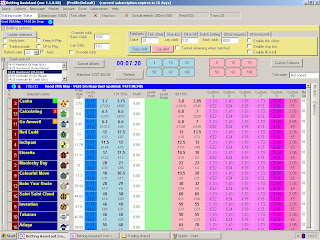
Looks quite different to the default doesn't it! Being able to define the layout and columns is a really nice feature, you just set it up how you want it.
Briefly, the columns for each selection/horse are as follows:
Rev - ability to swap the back and lay columns individually for each horse (you can do this for the whole market in preferences like in BetAngel).
Saddlecloth number
Name
Silks
Projected Betfair SP
A custom column - here I have a back column for £10 at odds of 1.11 (small profit but you will get matched at the best available price & can click as many times as you want!)
Standard back columns - I've chosen to have just 2 instead of the normal 3 to save space - this screenshot was taken on my laptop with quite a small screen.
Profit - your current P&L for each selection
Level profit - the green-up button
Alt level profit - I like the option of trying to green-up 1 tick ahead of the current back price in-play (instead of the current lay price, if there is one) as the spread can be huge - this can increase your profits substantially!
Standard lay columns - again, I've chosen to have just 2
Custom lay columns x 6 - this way I can lay just ahead of the current market back price at whatever seems like good value. I have fill-or-kill set to zero on the low-odds columns (these would only be used close to the finish of a race, so you don't want to hang around!), on the odds-against columns I don't use FOK so I have more chance of getting matched - if I change my mind I can just press cancel. The final two columns are the stake sizes selected when pressing back or lay on the standard columns.
In-running trading is all about speed and having these custom buttons set-up means that I can enter a bid into the market at the price I want with one click (rather than plumping for what is currently on offer, which can be expensive as the spread between the back price and lay price can be huge and very volatile). Each custom column has its own setting for fill-or-kill orders, this would usually be set to zero so that any unmatched part of your order is cancelled. This saves you from having an order sitting in the market which only gets matched when events in the race turn against you! Bear in mind that there is a 1 second delay imposed by Betfair for in-play horse racing markets, so by the time your order is in the market you may get matched even if there were no offers at your odds at the time you clicked your order.
The standard 3 back and lay columns need not also be set-up as fill-or-kill, but can be. They also have an independent stake button to the custom columns. It's really useful with all the information available to be able to order the columns as you want and you can also adjust the width of them all.
The refresh rate can be set as low as 0.1 second which is great for automation via Excel spreadsheets (more on that later in the post).
The fourth advantage regards the features of the ladder interface. What I particularly like is that the amounts already traded are shown graphically as well as having the actual amount superimposed on the mini-graphs. This means that you can see at a glance where the previous action has been, much easier than checking out all the figures. This gives you an immediate feel for whether this horse is trading in a tight band or whether a swing trade is on the cards.
Amounts available to back or lay beyond the 3 closest to the current market are also shown - this is a fairly standard software feature now - but you can also adjust the refresh rate for these. You also have the ability to have a column down the side showing your potential P&L for exiting your current trade at the various odds in view, I see the latest version of BetAngel has this feature now too. Personally, I don't use this feature because I'd rather try and make a decision when it is the right time to exit a trade rather than missing out on an exit point because it hadn't hit my desired profit level.

On the downside, the charting is pretty basic (although it does provide 3 moving averages with last price matched, you can choose between a line graph or candlesticks or both), more on a level with other software and nowhere near as sophisticated as the advanced charting on BetAngel. I find it interesting that some of the most successful traders blogs that I've read state they don't use charting at all or only a little.
You can choose whether to have 1, 2 or 3 ladders on view, either way you can see a mini grid-style view of all the runners to the right of the screen along with the total amount matched on each individual runner so far. I find this invaluable for quickly working out which horse I want to trade on when switching to a new market.
This has become quite a long post, so I'll split it up and finish-off advantages 4 to 8 in my next post!
Firstly, before I get onto Trading software I want to mention Google Reader. Sorry if everyone reading this is using Google Reader to do so, but just in case I'll mention it! In Google Reader, you can consolidate all the blogs that you follow to read in one place, rather that bookmarking them all. The massive time-saving advantage of this is that you can instantly see which blogs you follow have new postings since your last log-on without checking every blog from your bookmarks. This is great if you follow blogs that don't update regularly (cough, wink, who me?, cough), also great because you may only be interested in certain posts by a blogger, you can quickly see if a post is of interest from the title (each post is displayed on one line, rather like an e-mail). Finally, you can group related blogs into folders (e.g. trading, hobbies, news, tech, etc.) and see which folders have updated since your last log-in. You can bookmark/star favourite posts and share them with friends. You can visit any blog post at its original location if you want, just by clicking on the title.
I found a vid on youtube that shows you what it's about:
----------------------------
You'd be forgiven for thinking that BetAngel is the only option for trading software but there are other options which are well worth considering. I used BetAngel for a couple of years and started out back in 2005 on some other software. For the past 6 months I've been using Betting Assistant made by Gruss Software (http://www.gruss1-software.co.uk/). Knowing these 3 applications intimately helps give me an appreciation of what the differences are. For clarity, I'll refer to Betting Assistant as "Gruss", as "BA" could refer to BetAngel!
Gruss has been around since 2004 and is a very solid piece of software. Like BetAngel, I have never had a crash with Gruss, which is certainly not my experience with the other software I started out on in 2005. I lost my entire trading bank on a couple of occasions due to software crashes, which was ludicrous. I should have ditched the software after the first crash but I was reluctant to change what was familiar to me. Very bad strategy. Above all, software stability is surely the number one requirement for trading software.
In my experience, the main advantages of Gruss Betting Assistant over other software are mainly:
- (rock-solid software)
- Price
- In-running trading, due to user-configurable Grid-interface
- Some additional features in the Ladder interface
- Superior Excel interface
- Superb development support
- User-definable Green-up option, e.g. one-tick in front of current back price
- Integrated horse/selection notes section
The next point is really a unique feature to Gruss which is a massive advantage for In-Running trading. The grid interface is user-definable and has the capability for 24 custom columns! You can select which existing columns you want in preferences and order them any way you want and mix-in your custom columns too.
This may sound confusing, so here are some screen-shots. Here is the default grid interface (click on image to enlarge):

Most of this is fairly similar to other software so I won't explain it, if you install the software for the 30-day trial then you can use the help pages to explain it in detail, there is also an excellent user forum.
Here is the grid interface after I've set it up for in-running trading:

Looks quite different to the default doesn't it! Being able to define the layout and columns is a really nice feature, you just set it up how you want it.
Briefly, the columns for each selection/horse are as follows:
Rev - ability to swap the back and lay columns individually for each horse (you can do this for the whole market in preferences like in BetAngel).
Saddlecloth number
Name
Silks
Projected Betfair SP
A custom column - here I have a back column for £10 at odds of 1.11 (small profit but you will get matched at the best available price & can click as many times as you want!)
Standard back columns - I've chosen to have just 2 instead of the normal 3 to save space - this screenshot was taken on my laptop with quite a small screen.
Profit - your current P&L for each selection
Level profit - the green-up button
Alt level profit - I like the option of trying to green-up 1 tick ahead of the current back price in-play (instead of the current lay price, if there is one) as the spread can be huge - this can increase your profits substantially!
Standard lay columns - again, I've chosen to have just 2
Custom lay columns x 6 - this way I can lay just ahead of the current market back price at whatever seems like good value. I have fill-or-kill set to zero on the low-odds columns (these would only be used close to the finish of a race, so you don't want to hang around!), on the odds-against columns I don't use FOK so I have more chance of getting matched - if I change my mind I can just press cancel. The final two columns are the stake sizes selected when pressing back or lay on the standard columns.
In-running trading is all about speed and having these custom buttons set-up means that I can enter a bid into the market at the price I want with one click (rather than plumping for what is currently on offer, which can be expensive as the spread between the back price and lay price can be huge and very volatile). Each custom column has its own setting for fill-or-kill orders, this would usually be set to zero so that any unmatched part of your order is cancelled. This saves you from having an order sitting in the market which only gets matched when events in the race turn against you! Bear in mind that there is a 1 second delay imposed by Betfair for in-play horse racing markets, so by the time your order is in the market you may get matched even if there were no offers at your odds at the time you clicked your order.
The standard 3 back and lay columns need not also be set-up as fill-or-kill, but can be. They also have an independent stake button to the custom columns. It's really useful with all the information available to be able to order the columns as you want and you can also adjust the width of them all.
The refresh rate can be set as low as 0.1 second which is great for automation via Excel spreadsheets (more on that later in the post).
The fourth advantage regards the features of the ladder interface. What I particularly like is that the amounts already traded are shown graphically as well as having the actual amount superimposed on the mini-graphs. This means that you can see at a glance where the previous action has been, much easier than checking out all the figures. This gives you an immediate feel for whether this horse is trading in a tight band or whether a swing trade is on the cards.
Amounts available to back or lay beyond the 3 closest to the current market are also shown - this is a fairly standard software feature now - but you can also adjust the refresh rate for these. You also have the ability to have a column down the side showing your potential P&L for exiting your current trade at the various odds in view, I see the latest version of BetAngel has this feature now too. Personally, I don't use this feature because I'd rather try and make a decision when it is the right time to exit a trade rather than missing out on an exit point because it hadn't hit my desired profit level.

On the downside, the charting is pretty basic (although it does provide 3 moving averages with last price matched, you can choose between a line graph or candlesticks or both), more on a level with other software and nowhere near as sophisticated as the advanced charting on BetAngel. I find it interesting that some of the most successful traders blogs that I've read state they don't use charting at all or only a little.
You can choose whether to have 1, 2 or 3 ladders on view, either way you can see a mini grid-style view of all the runners to the right of the screen along with the total amount matched on each individual runner so far. I find this invaluable for quickly working out which horse I want to trade on when switching to a new market.
This has become quite a long post, so I'll split it up and finish-off advantages 4 to 8 in my next post!
Subscribe to:
Posts (Atom)